Launching Containers Using Apis
In Chapter 2, Working with Docker Containers, recipe Starting a container , we methodically and meticulously explored different ways of running containers. In all those scenarios, we used the docker container run command with a few options, and all our containers were up and running. However, behind the scenes, the Docker CLI makes it possible by first creating the container layer through the /create API and then launches the application ( cmd ) through the /start API, as visualized here:
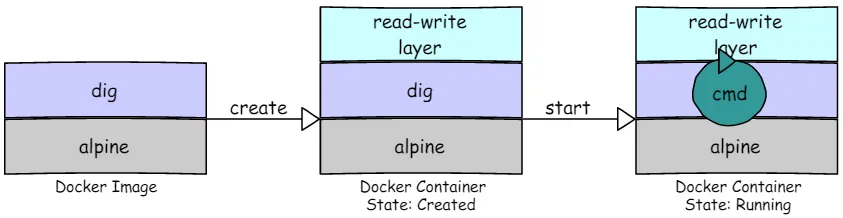
In addition to the /create and /start API, the Docker CLI uses APIs such as /attach and /wait to fulfill our request. In this recipe, we will create an alpine container and run a simple ls command to demonstrate the steps involved in launching a container through the Docker engine APIs.
How to do it…
- Begin by creating a container from an
alpineimage, as shown here:
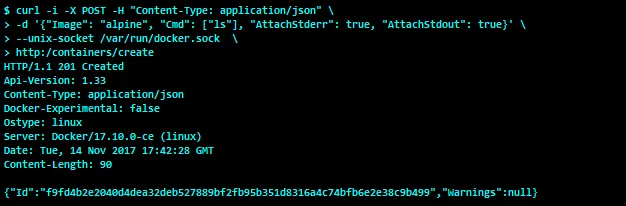
Here, we used the -d option of the curl command to pass our container configuration as a JSON data to the Docker engine. Evidently, the image is alpine , and the command we chose to run when the container starts is ls . In addition, we are also requesting the Docker engine to attach STDERR and STDOUT to this container, in order to retrieve the output of the ls command.
The HTTP header response code 201 Created indicates that our container is created successfully. Apparently, the response from the Docker engine is also a JSON payload. The ID field of the payload contains the container ID, which is f9fd4b2e2040d4dea32deb527889bf2fb95b351d8316a4c74bfb6e2e38c9b499 . We shall use the short version of the container ID, f9fd4b2e2040 , to perform further operations on this container.
- Since we want to capture the output of the
lscommand on the screen, let’s attach to the container using the/attachAPI:

The /attach API would block the client (namely, curl ) if it is called with the stderr , stdout , and stream parameter, so we are running the curl command in the background.
- Now, proceed to start the container using the
/startAPI, as demonstrated here:
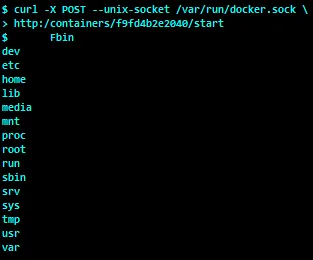
Cool, isn’t it? We emulated the docker container run command with the Docker engine APIs.
How it works…
In this recipe, we used three Docker engine APIs to successfully launch a container. In the backend, the Docker engine received the API calls from the client, and on behalf of the client it created the container for the /container/create API call, then blocked the HTTP stream for the /containers/attach API call, and finally ran the ls command inside the container’s namespace for the /containers/start API call.
There’s more…
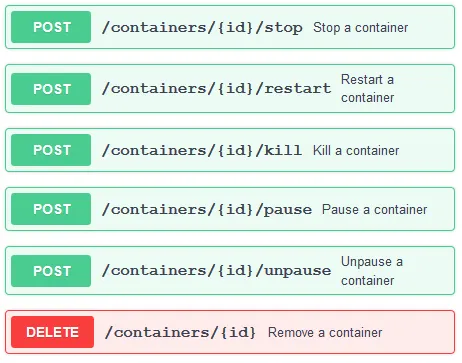
The following is the list of APIs that deal with the life cycle of a container:
See also
Each API endpoint can have different inputs to control operations. For more details, visit the documentation on the Docker website at https://docs.docker.com/engine/api/latest/.