Building Images Using Apis
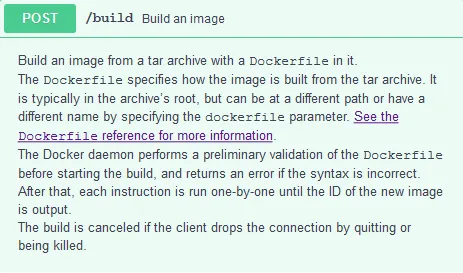
In the previous recipe, we explored a few actions on Docker images using APIs. In this recipe, we will build a Docker image using the /build API. Here is the /build API snippet from Swagger Editor:
How to do it…
- Begin by cloning the https://github.com/docker-cookbook/apache2 repository, as follows:
$ git clone https://github.com/docker-cookbook/apache2This repository contains the Dockerfile to bundle an apache2 service; listed here is the content of the Dockerfile :
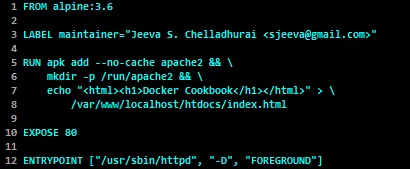
- Let’s create the build context by bundling the content of the cloned
apache2repository as a tar file, as demonstrated here:
$ cd apache2
$ tar cvf /tmp/apache2.tar *- Continue on to build the Docker image using the
/buildAPI:
$ curl -X POST \
           -H "Content-Type:application/tar" \
           --data-binary '@/tmp/apache2.tar' \
           --unix-socket /var/run/docker.sock \
           http:/build
While the build is in progress, you will receive the build logs as a series of JSON messages. Once the build is successfully completed, you will get a JSON message like this one:
{"stream":"Successfully built 3c6f5044386d\n"}In the preceding JSON message, 3c6f5044386d is the ID of the image we just built using the /build API.
How it works…
In this recipe, we bundled the build context as a tar file and sent it to the Docker engine as part of the /build API call. The Docker engine uses the build context and the Dockerfile in the build context to build the Docker image.
There’s more…
- In this recipe, we did not specify any repository or tag name, and hence the image is created without any repository or tag name, as shown here:
$ curl -s --unix-socket /var/run/docker.sock \
                 http:/images/json | jq ".[0].RepoTags"
[
"<none>:<none>"
]
Of course, you can now tag the image with the appropriate repository and tag name using the /images/{name}/tag API. Here is the help document snipped from the Swagger editor:
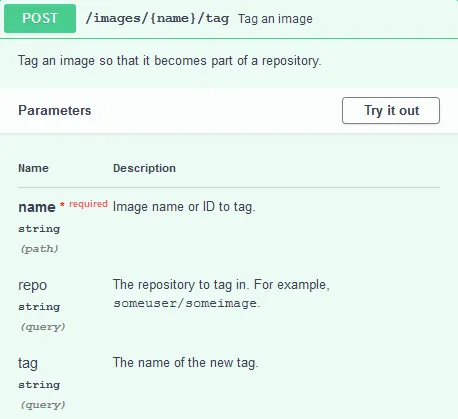
Alternatively, you can bundle the image with the repository name during the build time using the t parameter, as demonstrated here:
$ curl -X POST \
           -H "Content-Type:application/tar" \
           --data-binary '@/tmp/apache2.tar' \
           --unix-socket /var/run/docker.sock \
           http:/build?t=apache2:usingapi
The tag name is optional and if no tag name is specified, the Docker build engine will assume the tag name latest .
- You can also create an image from a container using the following API:

Here is an example of committing an image from a container ID 4aaec8980c43 :

See also
Each API endpoint can have different inputs to control the operations. For more details, visit the documentation on the Docker website at https://docs.docker.com/engine/api/latest/.