Introduction
Until now, we have worked with a single container and accessed it locally. But as we move to more real-world use cases, we will need to access the container from the outside world, share external storage within the container, communicate with containers running on other hosts, and so on. In this chapter, we’ll learn how to fulfill some of those requirements. Let’s start by understanding Docker’s default networking setup and then move on to advanced use cases.
When the Docker daemon starts, it creates a virtual Ethernet bridge with the name docker0 . Perhaps we can glean more insight into docker0 using the ip addr command on the system that runs the Docker daemon:

As we can see, docker0 has the IP address of 172.17.0.1/16 . Docker randomly chooses an address and subnet from a private range defined in RFC 1918 (https://tools.ietf.org/html/rfc1918). Using this bridged interface, containers can communicate with each other and with the host system.
By default, every time Docker starts a container, it creates a pair of virtual run on Ethernet interfaces and then performs the following with the pair:
-
Ties one end of the
vethpair to thedocker0bridge interface in the Docker host—let’s call this end the host end -
Ties the other end of the
vethpair to the newly created container as itseth0interface—let’s call this end of thevethpair the container end
Let’s start a container and examine its network interface IP addresses:
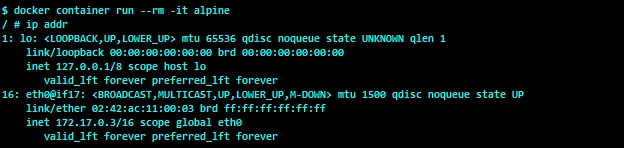
In the preceding screenshot, the container end of the veth pair is named eth0@if17 , where 17 is the interface index of the host end of the veth pair. We can use this index to identify the host end of the veth pair in the Docker host. The eth0 of the container is assigned the IP address 172.17.0.3 , which belongs to the docker0 subnet—that is, 172.17.0.1/16 .
Now, let’s take a peek at the interface at the seventeenth index:

Here, the host end of the veth interface is named vethe8b40b8@if16 , wherein 16 is the interface index of the container end of the veth pair. Since the interface at index 16 is assigned to the container’s network namespace, it is not displayed in the Docker host. The Docker Engine autogenerates the name of the host end veth pair by generating a seven-digit hex number and then appends it to the string veth. In this example, e8b40b8 is the random number generated by the Docker Engine. The Docker Engine also ensures that this random number is unique inside the Docker host. If you look closely, you might also notice that the host end of the veth interface is bound to the docker0 bridge.
Now let’s create a few more containers and look at the docker0 bridge using the Linux Ethernet bridge administration command, brctl .
NOTE
The Ubuntu Linux distribution does not usually carry the brctl tool, so we have to either install the bridge-utils package or leverage one of Docker’s nifty features that lets you share the Docker host’s network stack with the Docker container, as described in the Attaching container to the host network recipe.
Here, we are using the --network=host option of the docker container run command to connect to the Docker host’s network stack. Since the alpine image is packed with the brctl utility command, we will choose to spin our container with the alpine image and run the brctl show command to display the bridge details, as shown in the following screenshot:

Evidently, all the host ends of the veth pairs are bound to the default Docker bridge docker0 . Apart from setting up the docker0 bridge, Docker also creates iptables NAT rules, so that all containers can talk to the external world by default, but the external world cannot talk to the containers. Let’s look at the NAT rules on the Docker host:
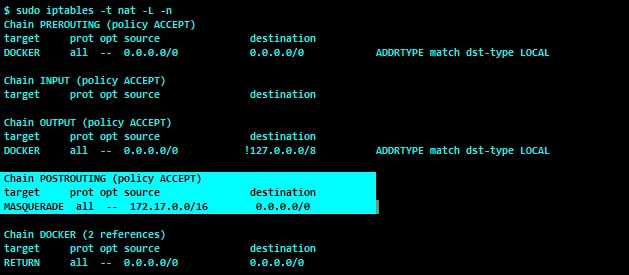
In the preceding output, a POSTROUTING rule is configured for the 172.17.0.0/16 subnet. The sole purpose of this rule is to change the source IP address of the data packets that originated from the 172.17.0.0/16 subnet to the host IP address. Apparently, the 172.17.0.0/16 subnet is assigned to our docker0 bridge. Essentially, this POSTROUTING rule enables the Docker containers to connect to the external world, as you can see in the following traceroute output:

Cool, isn’t it? Nonetheless, by default, Docker doesn’t do any network plumbing for the external world to connect to the containers. However, when you host a service inside the container, it must be reached from the external world. The Accessing containers from outside recipe demonstrates how to open up the service running inside the container to the external world. In addition, we have other recipes that focus on various aspects of single-host container networking.
NOTE
For more information about the different kinds of networking we discussed in the preceding section, visit: https://docs.docker.com/network/.
In this chapter, we focused only on single-host container networking. Along with single-host container networks, we will also look at how to share and persist data in the container paradigm.