Listing Containers
We can list both running and stopped containers.
Getting ready
Ensure that the Docker daemon is running on the host and can be connected through the Docker client. You will also need a few running and/or stopped containers.
How to do it…
To list the containers, either run the following command:
docker container ls [OPTIONS]Or run the following legacy command:
docker ps [OPTIONS]
How it works…
The Docker daemon will look at the metadata associated with the containers and list them. By default, the command returns the following:
-
The container ID
-
The image from which it was created
-
The command that was run after starting the container
-
The details about when it was created
-
The current status
-
The ports that are exposed from the container
-
The name of the container
There’s more…
To list both running and stopped containers, use the -a option as follows:

To return just the container IDs of all containers, use the -aq option as follows:
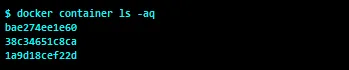
To show the last created container, including non-running containers, run the following command:
$ docker container ls -lUsing the --filter/-f option to ps , we can list containers with specific labels. Look at the Labelling and filtering containers recipe in this chapter for more details.
See also
Look at the help option of docker container ls :
$ docker container ls --helpThe documentation on the Docker website can be found here: https://docs.docker.com/engine/reference/commandline/container_ls/.